A single license can be used to activate the software on two separate computers (e.g. a desktop and a laptop). Each computer is identified to our activation server by a hardware ID, a unique number calculated using specific internal hardware components of the PC. Please note:
A key can be used an unlimited number of times on an activated computer;
A windows reinstall does not change the hardware ID and does not require an additional activation.
When an attempt to activate on a third computer is made (i.e. a computer with a new hardware ID), the activation server will return the message "Maximum activations reached". Please follow the on-screen instructions.
Note: Activation of the software requires an internet connection, either via the computer upon which it is being installed (online activation) or via another internet connected computer (offline activation).
Note: It is NOT possible to activate inside a virtual machine (such as VMWare).
Accessing the program activation screen
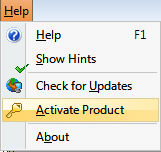
The product activation screen is accessed by clicking on "Help" in the top most menu (not the help button) and then "Activate Product", or by clicking the "Save Files" button: